
Blood Pressure Time Press Kit
Key facts about the app, plus images for news coverage, reviews, and articles.
The ZIP contains 51 images in Japanese and English, plus the introduction and usage terms as text files in both languages.
Introduction
Blood Pressure Time is an iPhone and iPad app for logging readings from a home blood pressure monitor, either by scanning the monitor's numbers with the camera or by typing them in. It automatically averages 2 or 3 readings taken in a row, and shows morning and evening trends in reports and graphs. With Premium, you can also export your records as a PDF to show your doctor or print.
The app records readings taken with a home blood pressure monitor. It does not measure blood pressure and does not provide medical diagnosis, treatment, or advice.
Main features
- Scan your monitor with the cameraSystolic, diastolic, and pulse are entered for you. Check and correct them before saving.
- Average 2 or 3 readings in a rowThe app saves the average as one record and keeps each reading.
- Morning and evening trendsReports and graphs for a week, a month, 6 months, or a year. You can also record temperature, mood, medication, and notes.
- PDF export for doctor's appointmentsSave, share, or print a PDF with a graph, your readings, and your daily records (Premium).
Fact sheet
| App name | Blood Pressure Time Japanese name: 血圧の時間 |
|---|---|
| Category | Health & Fitness |
| Devices | iPhone and iPad / iOS and iPadOS 26 or later |
| Languages | Japanese, English |
| Price | Free, with Premium as a one-time in-app purchase (US$7.99 in the US) No subscription or auto-renewal. Premium unlocks unlimited camera scanning, PDF export (save, share, and print), Home Screen widgets, and Quick Launch, and removes ads. |
| Free features | Logging, automatic averages of 2 or 3 readings, reports, graphs, calendar, Apple Health integration, and iCloud sync Camera scanning is free for the first 50 uses (2 or 3 readings in one session count as one use). |
| Version | 1.3.0 |
| Release date | October 12, 2026 |
| Developer | Mutsumi Suzuki Also the seller on the App Store. |
| Links | Official website App Store |
What's new in 1.3.0
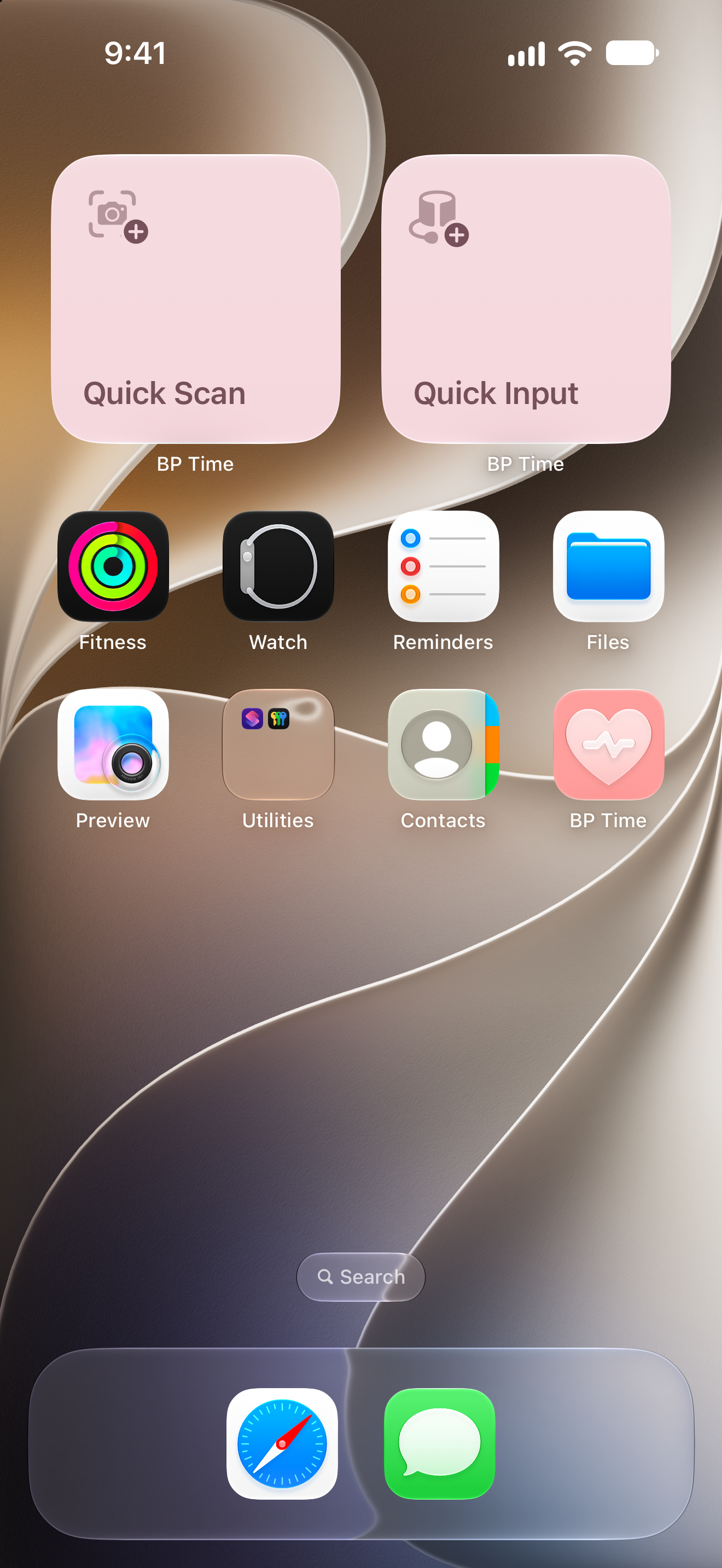
Log a reading right after you measure. Version 1.3.0 adds Quick Input and Quick Scan, which open the input screen or the camera scan screen directly, so you can start logging in fewer taps.
Free
- Quick Input and Quick ScanOpen them by touching and holding the app icon, or from Siri, Shortcuts, Lock Screen widgets, or Control Center. Quick Scan counts toward the 50 free uses.
Premium
- Home Screen widgets and Quick LaunchStart Quick Input or Quick Scan from your Home Screen. With Quick Launch, the app opens straight to the input or scan screen. Turn it on in the app's settings.
1320 × 2868 px
Download
Images
Click an image to view it larger.
Screenshots
Promotional images with headlines and device frames.
App screens
Screen images without headlines or device frames. They follow the language and device selected above.
The camera screens are composite images, with the blood pressure monitor added to the camera view (iPhone and iPad).
App icon
Usage terms
- These assets may be used for news coverage, reviews, and articles about Blood Pressure Time.
- You may resize them as long as the aspect ratio is kept. Please do not change the colors, shapes, or the text and numbers shown on the screens.
- Do not sell the assets themselves or redistribute them as a collection of assets.
Copyright and all other rights in the assets belong to Mutsumi Suzuki or the respective rights holders.
For other uses or questions about how to use the assets, please contact the Blood Pressure Time team.
Press releases
Blood Pressure Time App Adds Camera Scanning for Home Blood Pressure Monitors
血圧計の数値をカメラで読み取り。1.2.0の新機能を公開
(Scan the numbers on your blood pressure monitor with the camera: new features in version 1.2.0)
「血圧の時間」初回リリースのお知らせ
(Announcing the first release of Blood Pressure Time)
Press inquiries
To feature the app or ask about the assets, email us at the address below.
Blood Pressure Time team
press@bp-time.oyatonojikan.com